openwallpaper
Loading...
Searching...
No Matches
Drawing a triangle

Drawing a triangle is the "Hello, world" of graphics programming. It may seem overcomplicated if you didn't work with graphics APIs before. If so, think about why it's designed like this and could not be simplified, and you will understand it easily (this also works with any other programming concept).

Vertex buffer

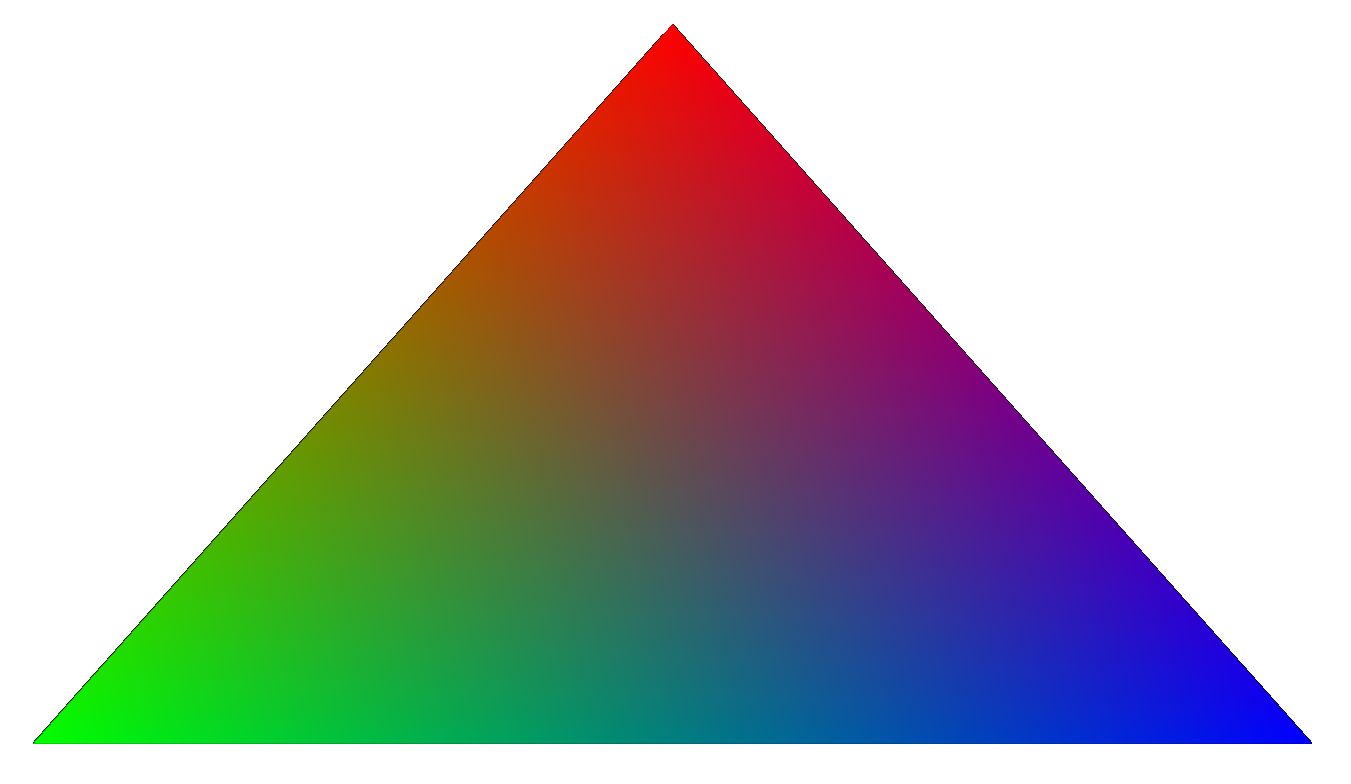
First, let's describe vertex data that we will send to the GPU. In triangle, we have 3 vertices, for each of them let's store a position in 2D space (x, y: float) and RGB color (r, g, b: float). GPU works in normalized device coordinates (NDC), where bottom left corner has (-1, -1) coordinates, and top right has (1, 1) coordinates. We will use the same coordinate system in our data.

typedef struct vertex_t {
float x, y;
float r, g, b;
} vertex_t;
static vertex_t vertices[] = {
{0, 0.5, 1, 0, 0},
{-0.5, -0.5, 0, 1, 0},
{0.5, -0.5, 0, 0, 1},
};

After we have vertex data, we need to upload it to the GPU so we can use it for drawing. To do this, we need to create a vertex buffer – a chunk of data in GPU memory, and copy our data to it. We can copy only inside a copy pass, which is an abstraction around GPU batching – all the copy calls inside one pass are sent to the GPU at once.

ow_vertex_buffer_id vertex_buffer = ow_create_vertex_buffer(sizeof(vertices));
ow_update_vertex_buffer(vertex_buffer, 0, vertices, sizeof(vertices));
void ow_end_copy_pass()
ow_vertex_buffer_id ow_create_vertex_buffer(uint32_t size)
void ow_update_vertex_buffer(ow_vertex_buffer_id buffer, uint32_t offset, const void *data, uint32_t size)
void ow_begin_copy_pass()
Definition openwallpaper.h:15

Shaders

Then, we will need to create a vertex shader and a fragment shader. Shaders are small programs that run on GPU for multiple data in parallel and quickly perform operations on it. Shaders are written in GLSL language and compiled into platform-independent SPIR-V bytecode that you can use with OpenWallpaper.

Vertex shader is used to transform vertex data from the buffer into the final vertex position on the screen. For example, it can quickly transform world-space coordinates into screen-space, so you don't have to update all the vertex data on the CPU when camera moves. In our case, we just pass through coordinates and color.

vertex.glsl:

#version 460
layout(location = 0) in vec2 a_position;
layout(location = 1) in vec3 a_color;
layout(location = 0) out vec4 v_color;
void main() {
gl_Position = vec4(a_position, 0, 1);
v_color = vec4(a_color, 1);
}

After vertex shader is ran for each vertex, its output vertices form triangles. These triangles are rasterized, i.e. converted into a set of pixels on the screen, and a fragment shader is ran for each of these pixels. Fragment shader should calculate and return a final color of a pixel.

Additional vertex shader output (in our case, v_color), is passed to fragment shader as input. But vertex shader is ran for each vertex, and fragment shader is ran for each pixel. So the value we see as an input of fragment shader is linearly interpolated from values of 3 vertices forming a triangle, where the closer you are to vertex, the higher its value weight is. This interpolation gives us a nice color gradient on our triangle.

fragment.glsl:

#version 460
layout(location = 0) in vec4 v_color;
layout(location = 0) out vec4 f_color;
void main() {
f_color = v_color;
}

To compile shaders into SPIR-V bytecode, install glslc and run:

glslc -fshader-stage=vertex vertex.glsl -o vertex.spv
glslc -fshader-stage=fragment fragment.glsl -o fragment.spv

Put resulting vertex.spv and fragment.spv files into scene.owf archive so you can load them from scene module. Load them with OpenWallpaper API:

ow_fragment_shader_id ow_create_fragment_shader_from_file(const char *path)
ow_vertex_shader_id ow_create_vertex_shader_from_file(const char *path)
Definition openwallpaper.h:70
Definition openwallpaper.h:59

Pipeline

You also need to create a pipeline object, that puts together all the draw call information.

.vertex_bindings = &(ow_vertex_binding_info){
.slot = 0,
.stride = sizeof(vertex_t),
},
.vertex_bindings_count = 1,
.vertex_attributes = (ow_vertex_attribute[]){
{.slot = 0, .location = 0, .type = OW_ATTRIBUTE_FLOAT2, .offset = 0},
{.slot = 0, .location = 1, .type = OW_ATTRIBUTE_FLOAT3, .offset = sizeof(float) * 2},
},
.vertex_attributes_count = 2,
.vertex_shader = vertex_shader,
.fragment_shader = fragment_shader,
.topology = OW_TOPOLOGY_TRIANGLES,
});
@ OW_TOPOLOGY_TRIANGLES
Definition openwallpaper.h:182
@ OW_ATTRIBUTE_FLOAT3
Definition openwallpaper.h:129
@ OW_ATTRIBUTE_FLOAT2
Definition openwallpaper.h:128
ow_pipeline_id ow_create_pipeline(const ow_pipeline_info *info)
Definition openwallpaper.h:81
Definition openwallpaper.h:288
Definition openwallpaper.h:265
Definition openwallpaper.h:255

Here we:

  • Say that our draw call will use one vertex buffer, where each vertex is sizeof(vertex_t) bytes long
  • For each vertex we interpret a segment of data starting from 0 as vec2 and put it to attribute slot 0 (a_position), and a segment of data starting from sizeof(float) * 2 as vec3 and put it to attribute slot 1 (a_color)
  • Bind vertex and fragment shaders that we loaded earlier
  • Specify OW_TOPOLOGY_TRIANGLES topology, which means that we're drawing triangles and vertices 0, 1, 2 will form first triangle, vertices 3, 4, 5 will form second triangle, and so on. There are also other ways to form triangles and lines (ow_topology), but it doesn't matter here because we only have one triangle

Draw call

We're initialized all the necessary stuff in init(), and now we're ready to do repeated draw call in update(). To do this, we use ow_render_geometry, binding pipeline object and vertex buffer, saying that we want to draw 3 vertices starting from 0 in 1 instance (described later). We do this in a render pass, which is a set of draw calls that is sent in batch to the GPU. In the beginning of render pass, we also clear the screen with black color.

ow_bindings_info bindings = {
.vertex_buffers = &vertex_buffer,
.vertex_buffers_count = 1,
};
.clear_color = true,
.clear_color_rgba = {0, 0, 0, 1},
});
ow_render_geometry(pipeline, &bindings, 0, 3, 1);
void ow_end_render_pass()
void ow_begin_render_pass(const ow_render_pass_info *info)
void ow_render_geometry(ow_pipeline_id pipeline, const ow_bindings_info *bindings, uint32_t vertex_offset, uint32_t vertex_count, uint32_t instance_count)
Definition openwallpaper.h:315
Definition openwallpaper.h:205

You may look at the final code in triangle example.